

In this chapter, we will study about Reading Settings in WordPress. Reading Setting is used to set the content related to the front page. You can set the number of post to be displayed on the main page.
Following are the steps to access the reading settings −
Step (1) − Click on Settings → Reading option in WordPress.
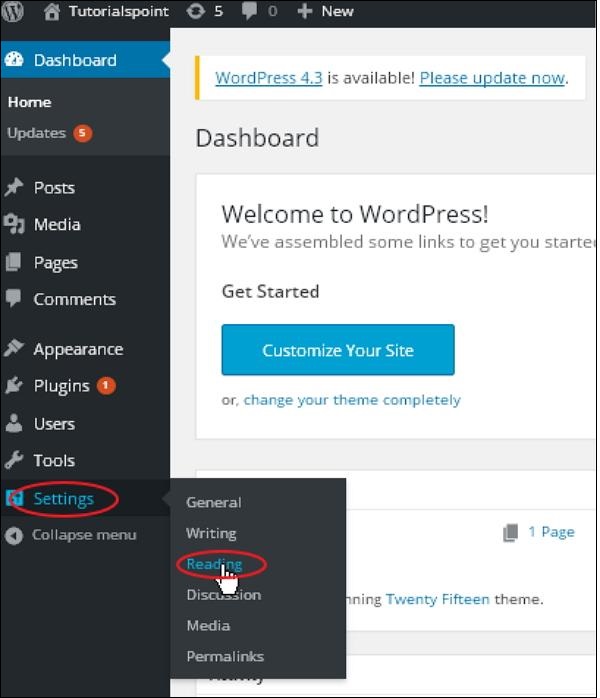
Step(2) − The Reading Settings page is displayed as shown in the following screen.
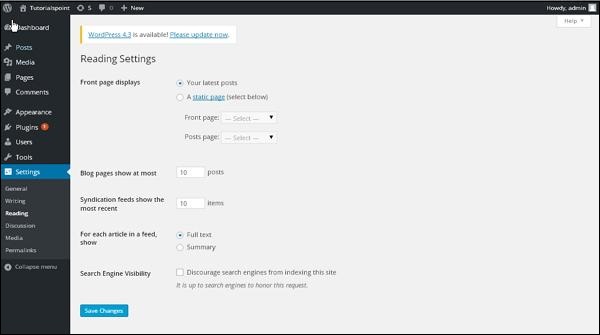
Following are the details of the fields on reading settings.
Front page displays − This section is used to display the front page in any of the following format −
Your latest posts − It displays latest posts on the front page.
A static page − It displays the static pages on the front page.
Front Page − You can select the actual page you want to display on front page from the drop down.
Posts Page − You can select the page from the drop down which contains posts.
Blog pages show at most − The number of posts to be displayed per page or site. By default, it is set as 10.
Syndication feeds show the most recent − The user can view the number of posts when they download one of the site feeds. By default, it is set as 10.
For each article in a feed, show − This section is used to display the post by selecting any of the following formats −
Full Text − It displays the complete post. It is set as default.
Summary − It displays the summary of the post.
Search Engine Visibility − After clicking on the checkbox, Discourage search engines from indexing this site, your site will be ignored by the search engine.
Step(3) − After filling all the information, click on Save Changes button to save your Reading Setting information.
Boqonnaa kana keessatti waa’ee Reading Settings WordPress keessatti ni qoranna. Sajoo Dubbisuu qabiyyee fuula duraa wajjin walqabatu saaguuf fayyadama. Lakkoofsa barreeffama fuula guddaa irratti mul'atu saaguu dandeessa.
Sajoo dubbisaa argachuuf tarkaanfiiwwan armaan gadiiti −
Step (1) − WoordPress keessatti Settings → Reading option jedhu cuqaasaa.
 jechuudha
Tarkaanfii(2) − Fuulli Sajoo Dubbisuu akka iskiriinii armaan gadii irratti mul’atutti mul’ata.
 jechuudha
Kan armaan gadii bal'ina man'eewwan qindaa'inoota dubbisuu irratti argamaniidha.
Fuula duraa agarsiisa − Kutaan kun fuula duraa bifa armaan gadii kamiyyuu agarsiisuuf fayyadama −
Barreeffamoota kee isa haaraa − Maxxansa haaraa fuula duraa irratti agarsiisa.
Fuula istaatiksii − Fuulota istaatiksii fuula duraa irratti agarsiisa.
Fuula Duraa − Fuula qabatamaa fuula duraa irratti agarsiisuu barbaaddu tarree irraa filachuu dandeessa.
Fuula Maxxansaalee − Fuula tarree irraa kan maxxansaalee of keessaa qabu filachuu dandeessa.
Fuulonni biloogii yoo baay’ate agarsiisu − Baay’ina barreeffamoota fuula ykn marsariitii tokkoof agarsiifamuu qaban. Akka durtiitti, akka 10tti qindaa'a.
Nyaata walnyaatinsaa kan isa dhiyoo agarsiisu − Fayyadamaan yeroo nyaata marsariitii keessaa tokko buufatu lakkoofsa barreeffamootaa ilaaluu danda’a. Akka durtiitti, akka 10tti qindaa'a.
Tokkoon tokkoon barruu nyaata keessa jiruuf, agarsiisi − Kutaan kun bifa armaan gadii keessaa kamiyyuu filachuudhaan barreeffama agarsiisuuf fayyadama −
Barreeffama Guutuu − Maxxansa guutuu agarsiisa. Akka durtiitti qindaa'a.
Cuunfaa − Cuunfaa barreeffamaa agarsiisa.
Mul’achuu Motora Barbaacha − Sanduuqa filannoo erga cuqaastee booda, Mootoroonni barbaacha marsariitii kana akka hin indeeksii godhu abdii kutachiisi, marsariitiin kee motora barbaachaatiin tuffatama.
Step(3) − Odeeffannoo hunda erga guuttanii booda, odeeffannoo Reading Setting keessan save gochuuf Save Changes button irratti cuqaasaa.





