

The WordPress Dashboard is a first screen which will be seen when you log into the administration area of your blog which will display the overview of the website. It is a collection of gadgets that provide information and provide an overview of what's happening with your blog. You can customize your needs by using some quick links such as writing quick draft, replying to latest comment, etc.
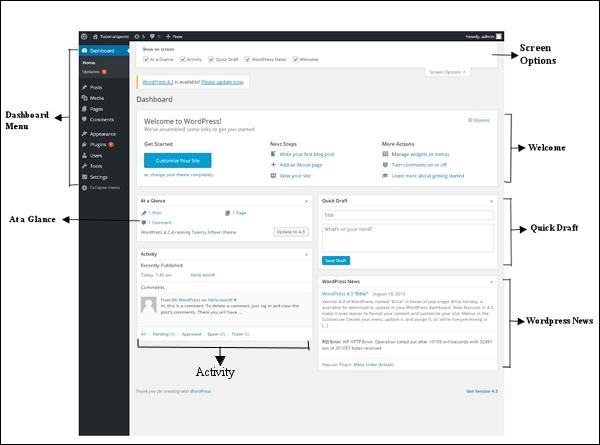
Dashboard can be categorized as shown in the following snapshot. Each of these categories are discussed in the following sections −
Dashboard Menu
The WordPress Dashboard provides navigation menu that contains some menu options such as posts, media library, pages, comments, appearance options, plugins, users, tools and settings on the left side.
Screen Options
The dashboard contains different types of widgets which can be shown or hidden on some screens. It contains check boxes to show or hide screen options and also allows us to customize sections on the admin screen.
Welcome
It includes the Customize Your Site button which allows customizing your WordPress theme. The center column provides some of the useful links such as creating a blog post, creating a page and view the front end of your website. Last column contains links to widgets, menus, settings related to comments and also a link to the First Steps With WordPress page in the WordPress codex.
Quick Draft
The Quick Draft is a mini post editor which allows writing, saving and publishing a post from admin dashboard. It includes the title for the draft, some notes about the draft and save it as a Draft.
WordPress News
The WordPress News widget displays the latest news such as latest software version, updates, alerts, news regarding the software etc. from the official WordPress blog.
Activity
The Activity widget includes latest comments on your blog, recent posts and recently published posts. It allows you to approve, disapprove, reply, edit, or delete a comment. It also allows you to move a comment to spam.
At a Glance
This section gives an overview of your blog's posts, number of published posts and pages, and number of comments. When you click on these links, you will be taken to the respective screen. It displays the current version of running WordPress along with the currently running theme on the site.
Daashboordii WoordPress iskiriinii jalqabaa yoo ta'u yeroo naannoo bulchiinsa biloogii keessanii seentan kan mul'atu yoo ta'u kunis ilaalcha waliigalaa marsariitichaa kan agarsiisudha. Innis walitti qabama gaajeeta odeeffannoo kennan fi ilaalcha waliigalaa waan biloogii keessan irratti ta'aa jiru kennudha. Hidhamtoota saffisaa tokko tokko kan akka wixinee saffisaa barreessuu, yaada yeroo dhiyootti deebii kennuu fi kkf fayyadamuun fedhii keessan dhuunfachuu dandeessu.
Dashboard akka suuraa armaan gadii irratti mul'atutti ramaduun ni danda'ama. Tokkoon tokkoon gosoota kanaa kutaalee itti aanan keessatti ibsamaniiru −
 jechuudha
Menu Daashboordii
Daashboordii WoordPress menu navigeeshinii kan filannoowwan menu tokko tokko kan akka maxxansaa, mana kitaabaa miidiyaa, fuula, yaada, filannoo mul'ataa, pilaaginoota, fayyadamtoota, meeshaalee fi qindaa'inoota gama bitaa of keessaa qabu kenna.
Filannoo Iskiriinii
Daashboordiin gosoota wiijetoota adda addaa kanneen iskiriinii tokko tokko irratti agarsiisuu ykn dhoksuu danda'an of keessaa qaba. Filannoowwan iskiriinii agarsiisuu ykn dhoksuuf sanduuqawwan filannoo of keessaa qaba akkasumas kutaalee iskiriinii bulchiinsaa irratti argaman akka dhuunfannu nu dandeessisa.
Baga nagaan dhufte
Innis Customize Your Site kan jedhu kan mata duree WoordPress keessan dhuunfachuu dandeessisu of keessaa qaba. Tarreen giddugaleessaa hidhannoowwan faayidaa qaban tokko tokko kanneen akka barreeffama biloogii uumuu, fuula uumuu fi fuula duraa marsariitii keessanii ilaaluu kenna. Tarreen dhumaa hidhaa wiijetoota, menu, qindaa'inoota yaada waliin walqabatan fi akkasumas hidhaa fuula Tarkaanfiiwwan Duraa WoordPress waliin koodeeksii WoordPress keessatti of keessaa qaba.
Wixinee Saffisaa
Wixineen Saffisaa gulaalaa barreeffama xiqqaa yoo ta'u, barreeffama tokko daashboordii bulchiinsaa irraa barreessuu, qusachuu fi maxxansuu kan dandeessisudha. Mata duree wixinee sanaa, yaadannoo tokko tokko waa’ee wixinee sanaa of keessatti qabatee akka Wixineetti qusadhu.
Oduu WoordPress
Widget Oduu WordPress oduu haaraa kanneen akka software version haaraa, updates, alerts, oduu software ilaallatu fi kkf blog WordPress official irraa agarsiisa.
Hojii
Wiijetiin Gocha yaada haaraa biloogii kee irratti, barreeffamoota dhiheenya kanaa fi barreeffamoota dhiheenyatti maxxanfaman of keessatti qabata. Yaada tokko raggaasisuu, fudhachuu dhiisuu, deebii kennuu, gulaaluu ykn haquuf si dandeessisa. Akkasumas yaada tokko gara spam tti akka sochoostu si dandeessisa.
Ilaalcha Keessatti
Kutaan kun barreeffamoota biloogii keessanii, baay’ina barreeffamootaa fi fuula maxxanfaman, fi baay’ina yaada kennaman ilaalcha waliigalaa kenna. Links kana yeroo cuqaastan gara screen walfakkaataa ta'etti ni geeffamtu. Innis version ammaa WordPress hojjechaa jiru mata duree amma marsariiticha irratti hojjechaa jiru waliin agarsiisa.





